
Care Home Management Software: A Buyer's Guide for UK Homes
A care home runs on a hundred small records: who is on shift, who ate, who fell, who had their tablets, whose room is free next month, whose training expired last week. Almost every home holds most of that on paper, in a diary, or in a system that does one part of it well and the rest not at all. It works until an inspector asks you to prove something, or until the person who knew where everything was goes on leave.
Care home management software is the alternative: one system holding residents, staff, medication, incidents, occupancy and finance, so the record is a by-product of the work rather than a separate job done badly at 5pm. This guide covers what it does, why a care home needs different software from a home care agency, the features that matter, and how to compare vendors without being sold to.
What is care home management software?
It is the operational platform a residential or nursing home runs on. Most systems cover some version of the following: a resident record with care plans and risk assessments, staff rostering across shift patterns, daily care recording by carers on the floor, electronic medication records, incident and falls reporting, occupancy and fee management, and the reporting that ties it together for managers and inspectors.
It sits in the wider family of care management software, narrowed to the residential setting. The narrowing is not cosmetic, which is the next section, and it is the single most common buying mistake in the sector.
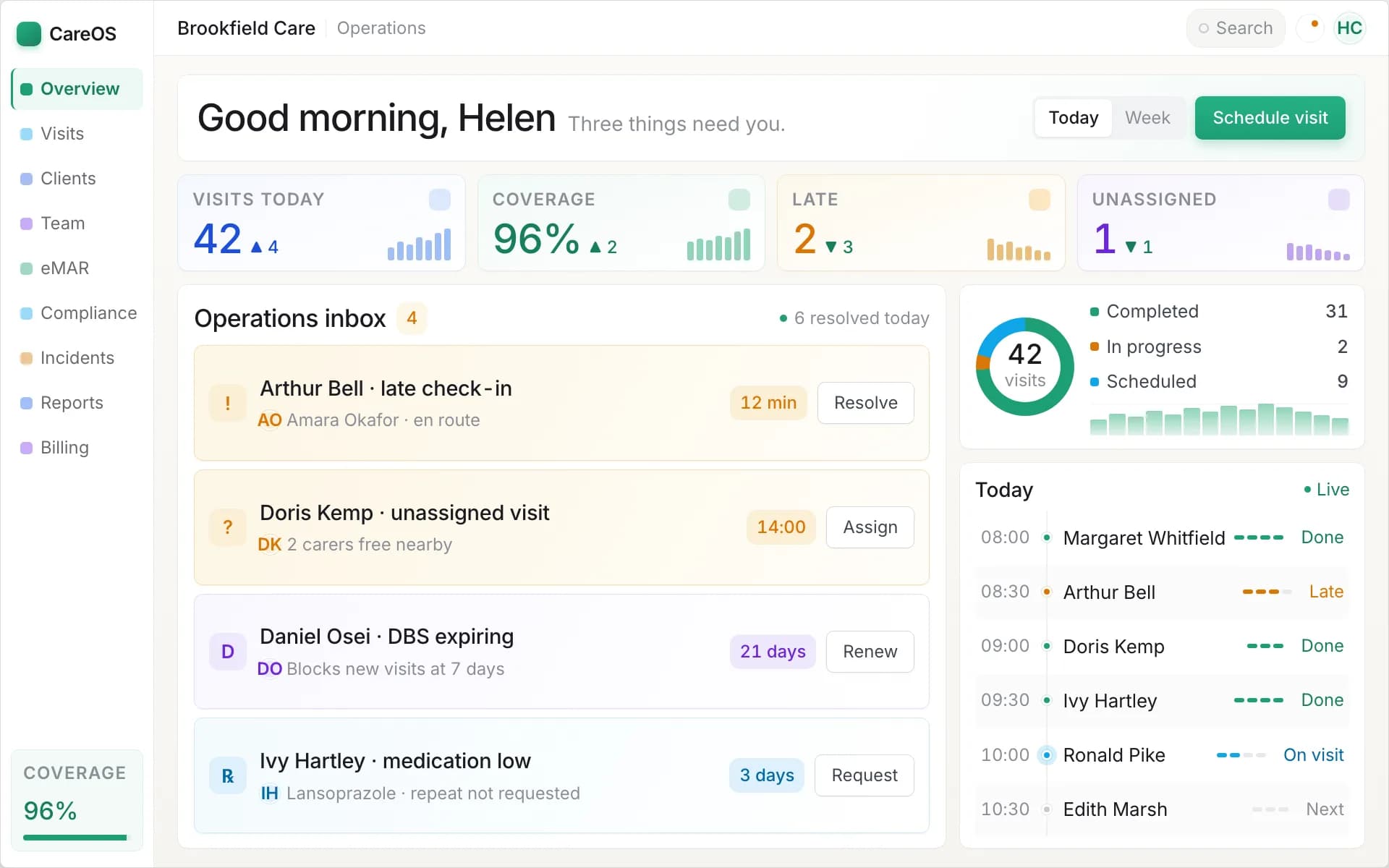
One view of the home today: what has happened, what is outstanding, and what needs a decision.
Why a care home is not a home care agency
Software built for domiciliary care gets residential care wrong in ways that are obvious once you see them and invisible in a demo.
Everybody is already there. Home care software is organised around visits: discrete appointments at scattered addresses, with travel time between them and a check-in that proves the carer arrived. None of that applies in a home. Care is continuous, delivered across a shift, by staff who are on site all day. Force a residential home into a visit-based model and you get carers checking in and out of rooms all day to satisfy a system that thinks they have driven somewhere.
The unit of rostering is the shift, not the call. You are covering a building around the clock: earlies, lates, nights, floats, and a minimum staffing level per unit that must never be breached. The hard problem is not travel-aware allocation, it is safe cover, and a system that cannot express "this floor needs two carers and a senior on nights" is not doing the job.
The volume of records is enormous. A home care agency might record six visits per client per week. A care home records food and fluid, personal care, continence, repositioning, mood, sleep and activity, for every resident, every day. Recording has to be fast on a handheld device or staff will do it at the end of the shift from memory, which is both worse care and worse evidence.
Occupancy is a commercial concern. Empty beds are lost revenue and a home care system has no concept of them. You need to see occupancy, notice periods, the enquiry pipeline and fee changes, because the finance question in a home is "are we full and are we charging correctly", not "how many hours did we deliver".
If you also deliver care in people's homes, that model is covered in the domiciliary care software guide, and the differences there are the mirror image of these.
The features that matter
Resident records and care planning
The resident record is the spine. Look for person-centred care plans that are genuinely usable by staff on the floor rather than a document nobody opens, linked risk assessments covering falls, skin integrity, nutrition, moving and handling, and choking, and review-date tracking that tells you a plan is about to lapse instead of leaving you to discover it at audit.
The practical test: can a bank carer working their first shift on your unit find out what this resident needs, how they like their care given, and what the risks are, in under a minute, on the device in their hand?
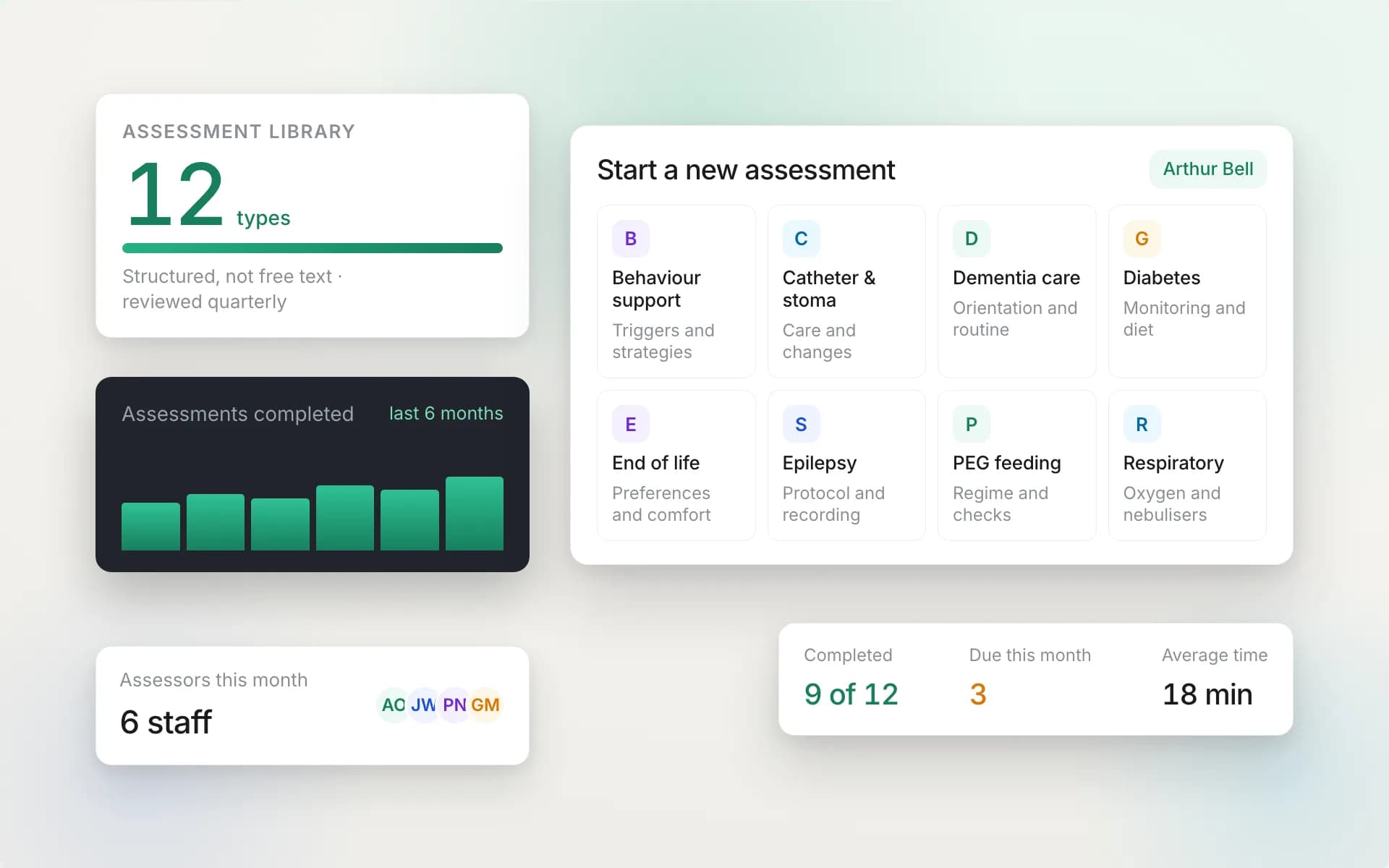
Assessments and care plans as live records, with reviews tracked rather than remembered.
Daily care recording
This is where most of the system's value is either earned or lost, because it is the part your staff touch fifty times a shift. It has to be fast. Recording a fluid intake should be two taps, not a form. Records should be attributable, timestamped, and impossible to backdate silently.
Watch for the gap between "we have care notes" and "our carers actually use them during the shift". Ask to see the recording screen on a phone, not a laptop, and ask how long a full personal care record takes to enter.
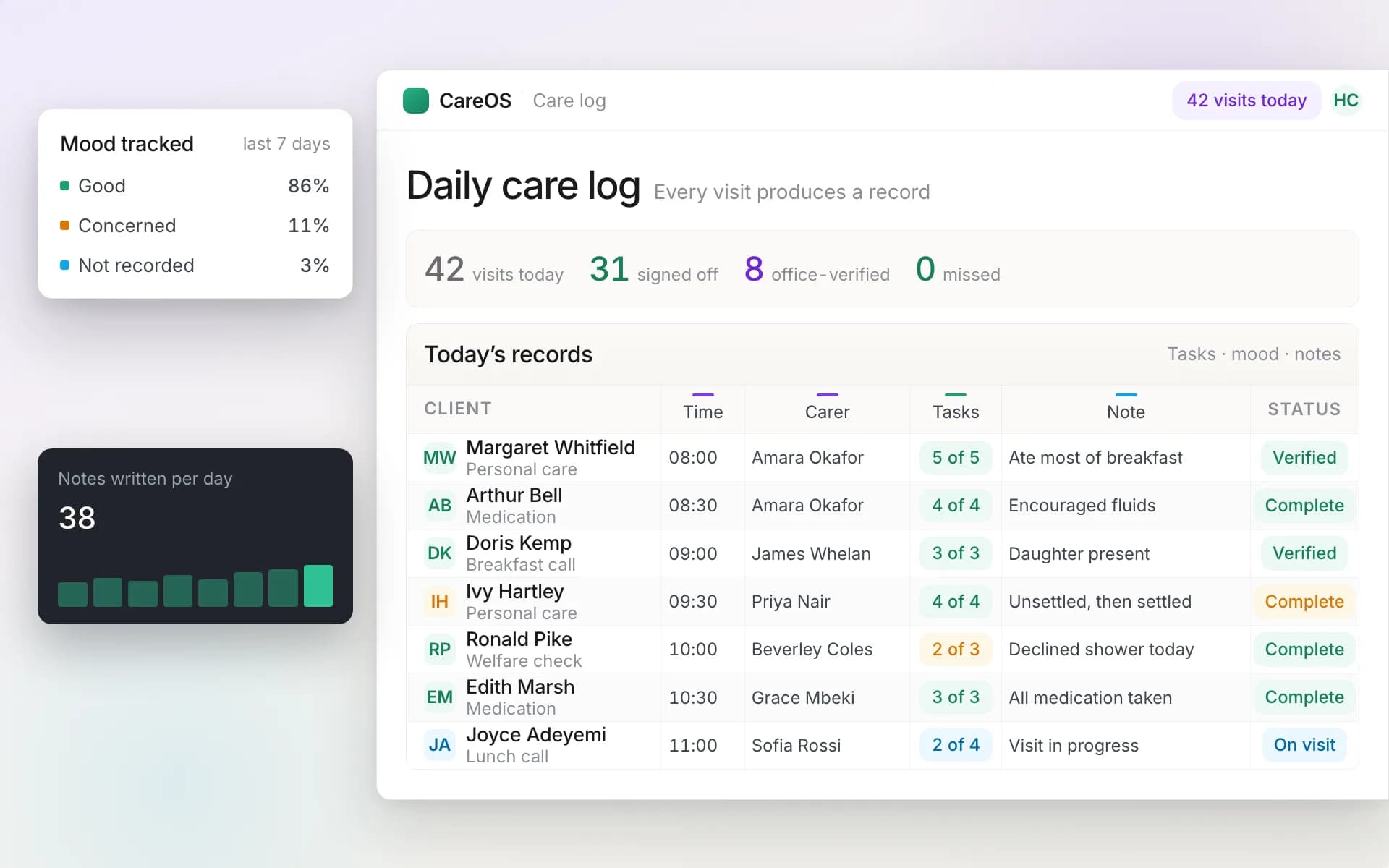
Daily records captured against the resident as care happens, not written up from memory at handover.
Electronic medication records (eMAR)
Medication is the highest-risk activity in the building and paper MAR charts fail quietly. A missed signature is found at the monthly audit, long after anything can be done. Electronic MAR presents the round to the senior on shift, records given, refused or withheld with a reason, handles as-needed medication with the reason and the outcome, supports controlled drug witnessing, and alerts somebody when a dose passes its window unrecorded.
The alerting is the part that separates a real eMAR from a digital form. If nobody is told until the audit, you have moved the paper onto a screen without changing the safety.
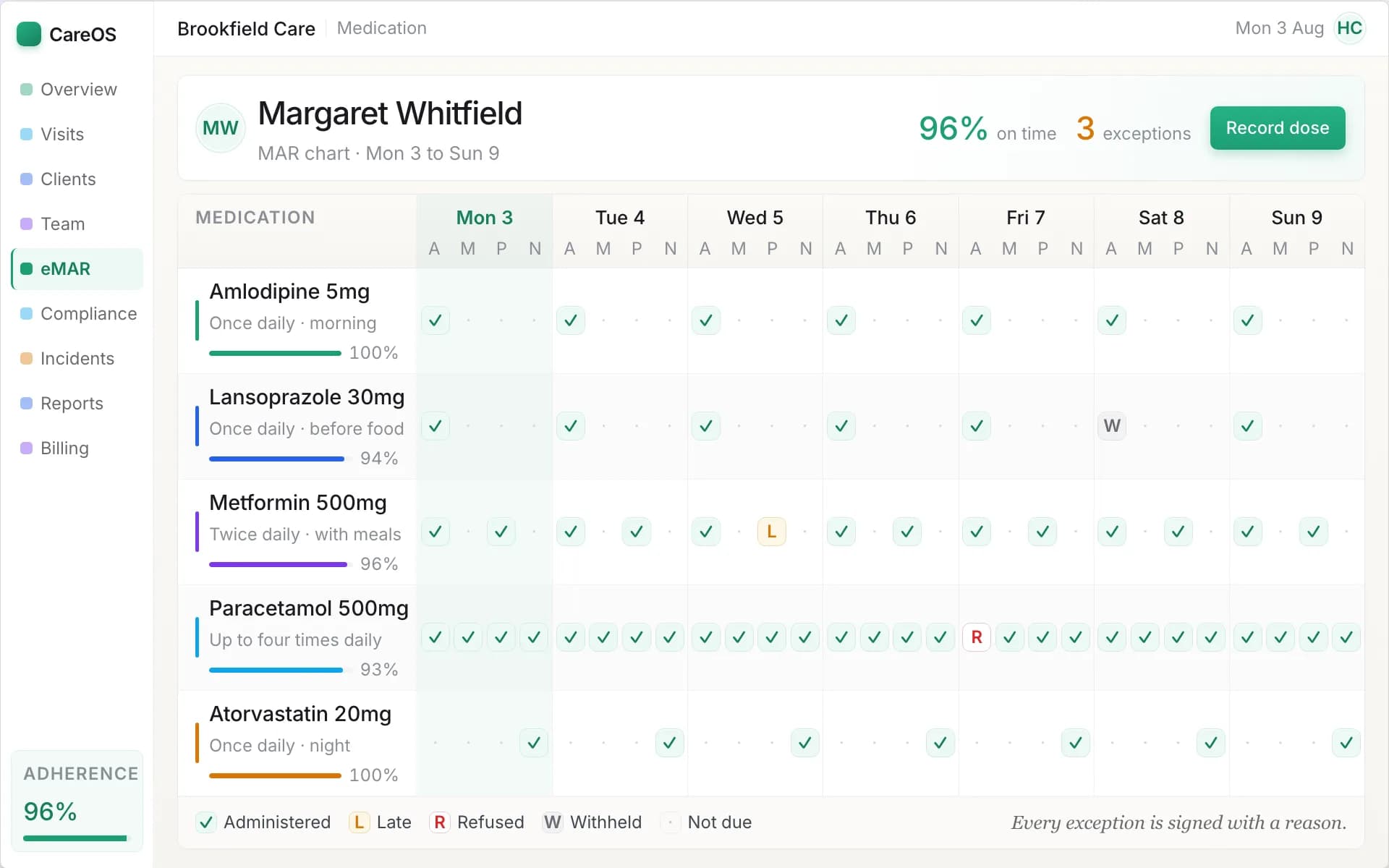
Each dose recorded against the resident and the time it was due, with missed doses surfaced immediately.
Incidents, falls and safeguarding
Falls are the defining incident type in residential care and the one the CQC will ask about. You want incident reporting that staff can complete on the spot, categorisation that lets you see patterns by resident, location and time of day, actions and outcomes recorded against each incident, and a clear line to safeguarding referrals and statutory notifications where they are needed.
A home that can show an inspector "here are our falls for the last six months, here is the resident who accounts for four of them, here is what we changed after the third, and here is what happened next" is in a different position from one that produces a folder.
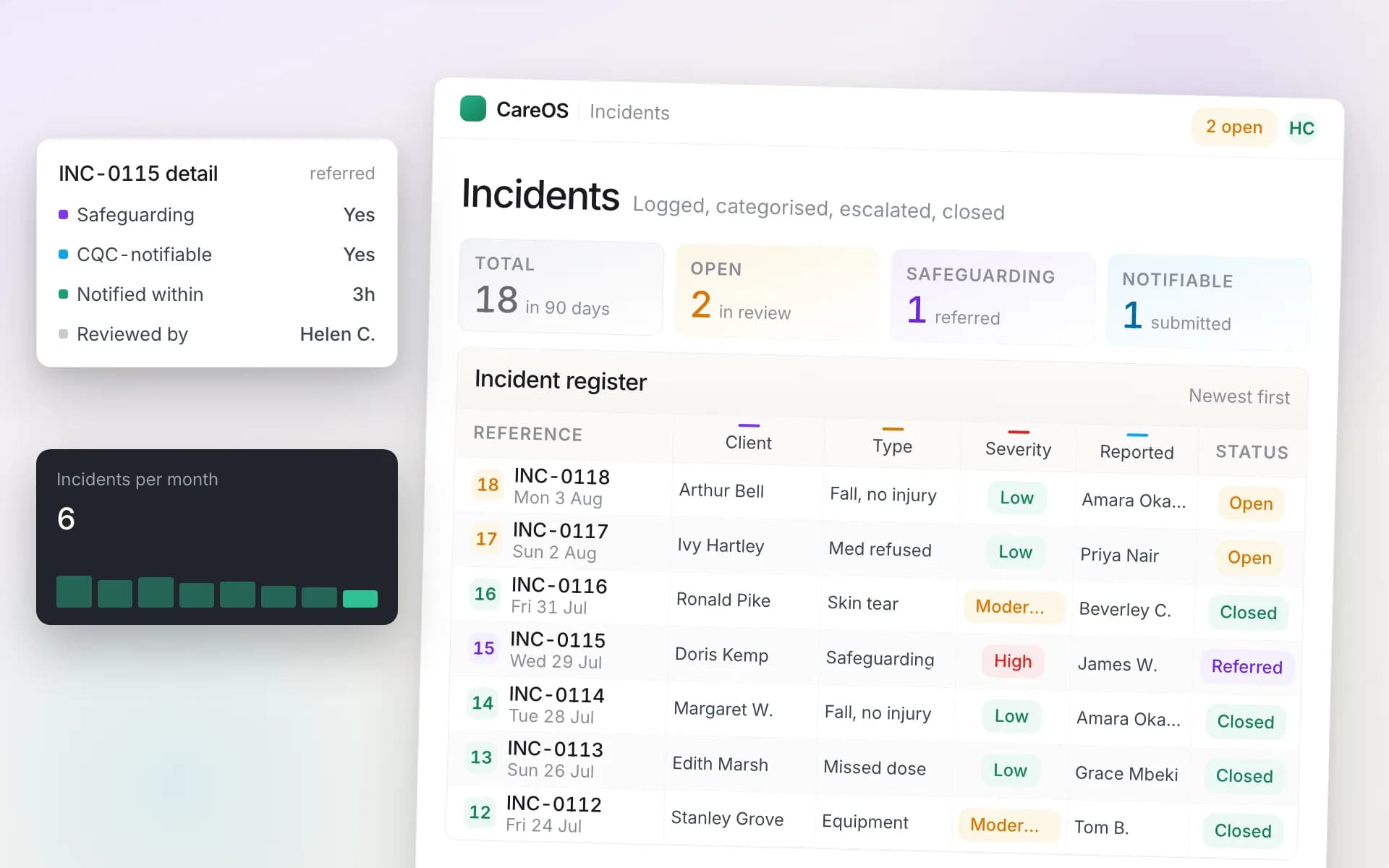
Incidents recorded at the point they happen, categorised so patterns are visible rather than anecdotal.
Rostering and safe staffing
Shift-based rostering with skill mix, so a rota cannot be published that leaves a unit without a senior or a nurse — a constraint our nursing home management software guide covers in clinical depth. Look for handling of bank and agency staff, absence and cover, and a link into your compliance data so somebody whose mandatory training has lapsed cannot quietly be rostered onto a shift. Our care home rota software guide covers what to test here in depth.
Ask what happens when two people call in sick at 06:00 on a Sunday. That is the real test of a rostering module.
Staff compliance and training
Every member of staff carries DBS, right to work, mandatory training, supervisions and appraisals. In a home with sixty staff this is a full spreadsheet that nobody has time to maintain, and it is one of the first things an inspector will ask to see. The system should track each requirement per person, flag expiries in advance, and produce the matrix on demand.
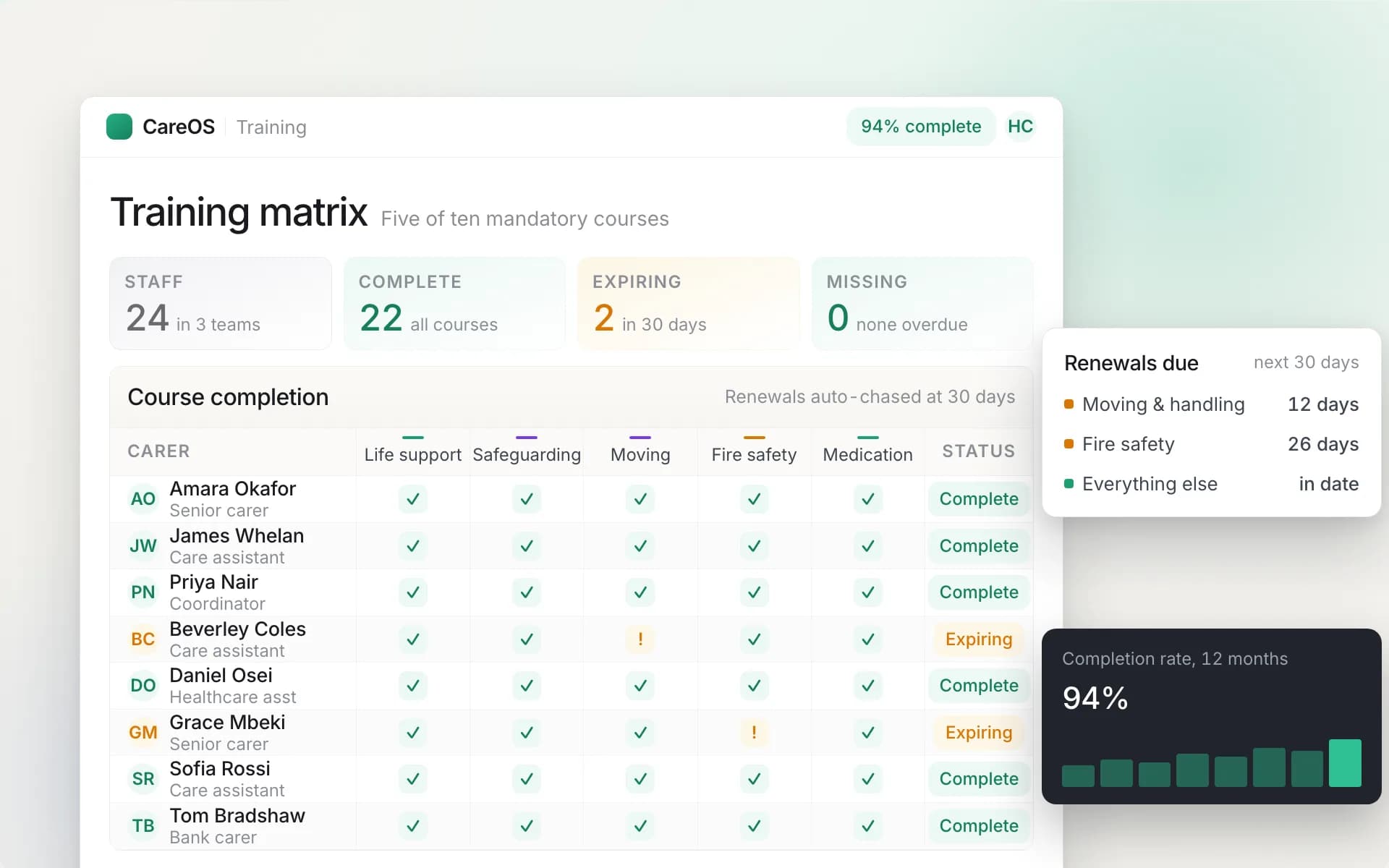
Training and compliance tracked per member of staff, with expiries visible before they become gaps.
Occupancy, fees and finance
Occupancy tracking, the enquiry and admission pipeline, fee rates by funder, and invoicing that reflects who was actually resident and for how long. Local authority, NHS-funded and private residents are charged differently and often change category mid-stay, so ask specifically how the system handles a fee change part way through a billing period, and how it handles a resident who is in hospital.
Family communication
Families are the other audience for everything above. A family portal that shows relatives what care was delivered reduces inbound calls and is increasingly a factor when a family is choosing between homes. Check you can control precisely what is visible, because the boundary matters.
Regulation: what the software has to evidence
For homes in England, the CQC assesses your service against quality statements, and the evidence it looks for is largely what this software produces. A well-configured system means an inspection is a matter of running reports rather than assembling folders.
The areas where a system earns its place: medication administration records, current and reviewed care plans, incident and falls records with actions taken, staff training and recruitment compliance, safe staffing evidence from the rota, and an audit trail showing who recorded what and when. That last one is quietly the most important. A record nobody can attribute is weak evidence, and a system that lets records be edited without a trail is a liability rather than an asset.
Two other things to raise with any vendor. DSCR, NHS England's Digital Social Care Records programme, is moving the sector towards assured systems and affects access to associated funding, so ask whether a vendor is assured or pursuing assurance. NHS DSPT, the Data Security and Protection Toolkit, is your annual data-security self-assessment, and since your vendor holds your data their posture affects your submission. Ask what they meet and how they will support you.
Moving off paper without a bad fortnight
The implementation, not the software, is what decides whether this goes well.
Migrate rather than retype. Your resident records, care plans, staff files and compliance data need to get in somehow. Ask the vendor to do it and be sceptical of any answer that amounts to "you enter them". Retyping forty care plans is a fortnight of somebody's life and it is rarely priced.
Run parallel briefly. A week or two of the new system alongside the current process means a gap costs you nothing. Longer than that and staff will use whichever is easier, which will be the old one.
Train on the floor, not in a room. Care staff learn the app by using it on a shift with someone beside them. A classroom session before go-live is forgotten by Tuesday.
Start with one unit if you are large. A single floor going first gives you champions who can help everybody else, and a smaller blast radius if something is wrong.
Pick your moment. Not the week of an expected inspection, not Christmas, not during a manager vacancy.
Comparing vendors
Build one grid, fill it from live demos rather than brochures, and make every vendor answer the same questions.
| Requirement | What to check |
|---|---|
| Built for residential | Shift-based, not visit-based; occupancy is a first-class concept |
| Care planning | Person-centred, review-tracked, usable by staff on the floor |
| Daily recording | Fast on a handheld, attributable, timestamped, no silent edits |
| eMAR | Rounds, as-needed doses, controlled drugs, real-time missed-dose alerts |
| Incidents and falls | Point-of-care reporting, pattern analysis, actions and outcomes |
| Rostering | Skill mix and minimum staffing enforced, absence cover, links to compliance |
| Compliance | Per-requirement tracking with expiry alerts across all staff |
| Occupancy and fees | Enquiry pipeline, funder rates, mid-period fee changes, hospital stays |
| Family | Controlled visibility of delivered care |
| Regulation | Fluent on CQC evidence, DSCR and NHS DSPT |
| Migration | Vendor moves your data, with a defined process |
| Exit | Full export of your data, reasonable notice period |
Two questions worth asking every vendor, because the answers are revealing. First: show me, live, what happens when two carers call in sick at 06:00 on a Sunday. Second: show me exactly what you would put in front of an inspector who asks about falls.
Where to go next
For the wider category and how the settings differ, start with care management software. If your organisation also delivers care in people's own homes, the domiciliary care software guide covers the visit-based model in the same depth.
CareOS supports residential and nursing homes with resident records, shift rostering, daily care recording, eMAR, incidents and falls, occupancy and finance in one CQC-ready system. See the care home product overview for what that covers in practice, or book a demo and ask us to run your own worst Sunday rather than a rehearsed script.
Frequently asked questions
What does care home management software do?
It holds resident records and care plans, rosters staff across shifts, captures daily care recording on the floor, manages medication through an electronic MAR, records incidents and falls, tracks occupancy and fees, and produces the reporting that managers and inspectors need. The aim is that the record is a by-product of the work rather than a separate task at the end of a shift.
Can I use home care software in a care home?
Poorly. Home care software is organised around visits, travel between addresses and proof that a carer arrived, none of which apply when everybody is already in the building. Residential care needs shift-based rostering with skill mix and minimum staffing, high-volume daily recording, and occupancy as a first-class concept. Ask any vendor which setting their product was built for.
What should a care home eMAR include?
Scheduled medication rounds, as-needed medication with the reason and outcome recorded, controlled drug witnessing, and alerting to somebody in charge when a dose passes its window unrecorded. The alerting is what separates a real eMAR from a digital form: if a missed dose is only found at the monthly audit, the paper has moved onto a screen without changing the safety.
How does care home software help with CQC inspections?
It produces the evidence inspectors ask for as a normal by-product of daily work: medication records, current and reviewed care plans, incident and falls records with the actions taken, staff training and recruitment compliance, safe staffing from the rota, and an audit trail showing who recorded what and when. The difference at inspection is running a report rather than assembling folders.
How long does it take to move a care home onto new software?
Typically a few weeks rather than a few days, and the variable is data migration. Plan for the vendor to move your resident records, care plans, staff files and compliance data, a short parallel-running period so nothing is lost, and training delivered on the floor during real shifts rather than in a classroom. Large homes often start with one unit.
Should a small care home bother with software?
The trigger is usually not size but a specific pain: an inspection that exposed the paperwork, a medication error nobody caught in time, a rota that takes a day a week, or occupancy and fees that nobody can reconcile. If none of those apply, you may not need to buy this year. If two or more do, the cost of the problems is usually larger than the cost of the system.
Keep reading
- Nursing Home Management Software: What the Nursing Part ChangesMost care home software was built for the residential model and had the word nursing added to the brochure. What the nursing registration actually changes about the software you need, and five things to make a vendor show you live.
- Care Rostering Software: How to Build a Rota That Survives Monday MorningThe rota is where a care service is actually run, and it is usually held together by one person and a spreadsheet. How rostering software encodes what they know, and the five scenarios to insist on in a demo.
- eMAR Software: Electronic Medication Records for UK Care ProvidersA missed dose on a paper chart is discovered a month later, when nothing can be done. What electronic MAR changes, at the point of care and in the office, and the two questions to ask every vendor.
CareOS by care setting
The platform is one system with a workspace per setting. See what it looks like for yours:
See CareOS against your own worst-case Monday
CareOS is UK care management software: rostering, eMAR, care plans, compliance and finance in one system, with a workspace built for each care setting and designed around CQC, Ofsted and DSCR requirements.
Book a demo