
Care Management Software: What It Does and How to Choose
Ask ten people in UK social care what care management software is and you will get ten answers, most of them the name of whichever system they happen to use. The category label is genuinely vague, which is a problem when you are trying to buy. You end up comparing a rota tool against a care records system against a compliance tracker, all filed under the same heading, all quoting for different things.
This guide fixes the definitions first and the shortlist second. It covers what care management software actually is, the six modules that make up a complete system, why software built for healthcare is not the same thing and will hurt you if you buy it by mistake, and a way to compare vendors that survives contact with a sales demo.
It is written for UK providers: home care agencies, care homes, supported living services, children's homes, and care staffing agencies. Regulation shapes what this software has to do here in ways it does not elsewhere, so most of the American advice you will find is subtly wrong for you.
What is care management software?
Care management software is the operational system a regulated care provider runs on. It holds the record of the people you support, plans the care they receive, gets the right staff to them, captures what happened, keeps your workforce compliant, and turns all of it into invoices and pay.
That is a wider job than any single module. A rota tool schedules staff and stops there. An eMAR product records medication and stops there. Care management software is the platform those modules sit inside, sharing one set of records, so that the visit you scheduled is the visit the carer sees on their phone, is the visit that gets recorded, is the visit you invoice for. When those are separate systems, the joins between them become somebody's job, and that somebody is usually your most experienced coordinator.
You will see the category called a few other things. Care management system is the same thing. Social care software is the same thing, said in the language of the sector rather than the language of software. Digital social care records, or DSCR, is the NHS England programme name and refers specifically to the care records part. Home care software, care home management software and supported living software are the same category narrowed to one setting.
The narrowing matters more than most vendors admit, which is the next section.
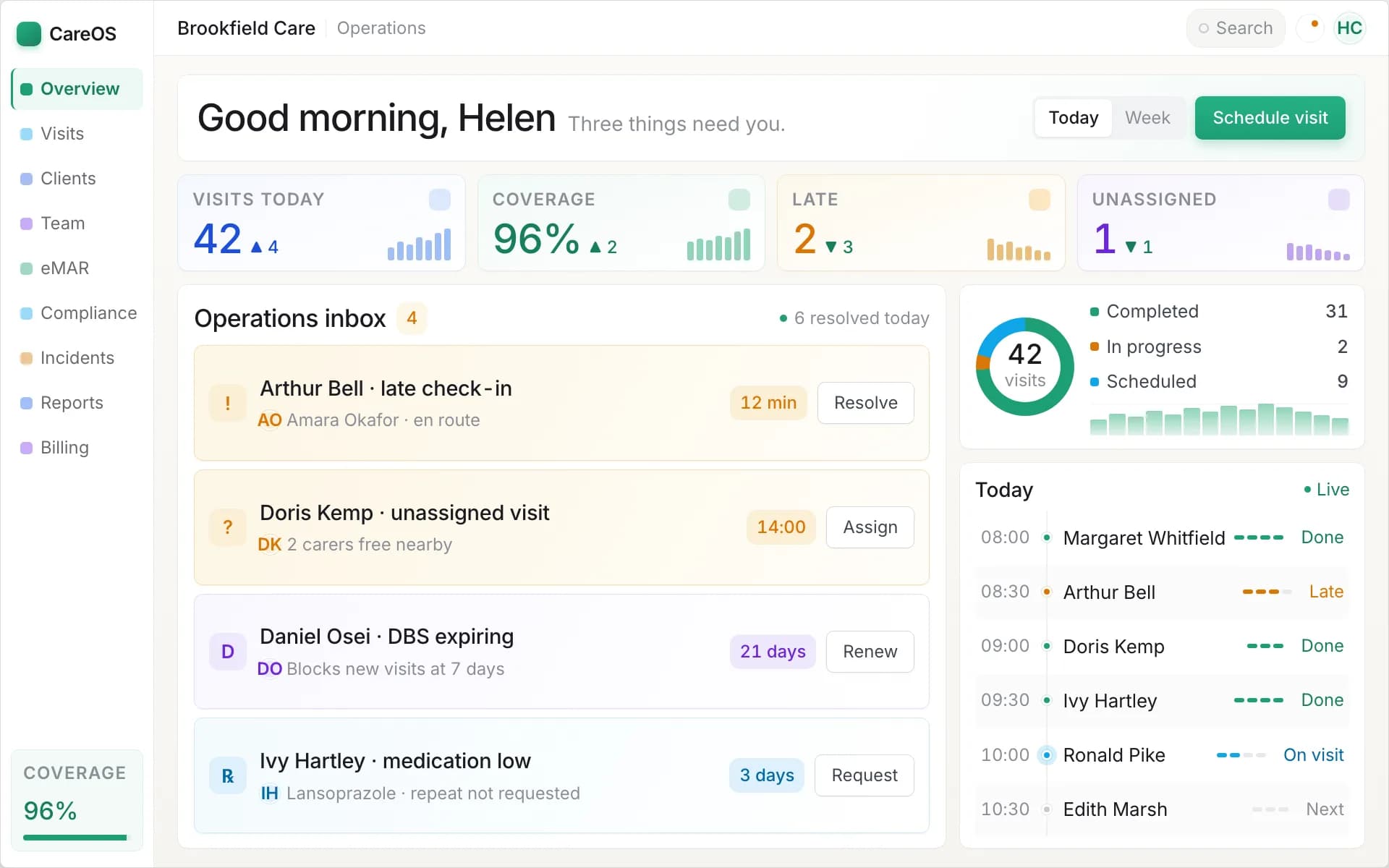
One operational view: what is scheduled, what has happened, and what needs a decision today.
Who uses it, and why the setting changes the software
Care is delivered in several different shapes, and the shape determines what the software has to be good at. A system that is excellent in one setting is usually mediocre in another, because the hard problems are not the same hard problems.
Home care agencies deliver care as scheduled visits to scattered addresses. The hard problems are rota density, travel time between calls, continuity of care, and proving a visit happened at the right place at the right time. If you are here, start with our guide to domiciliary care software, which goes into the visit-based model in detail, or the home care management software overview.
Care homes deliver care to residents under one roof, around the clock. Travel is irrelevant. Instead the hard problems are shift cover, occupancy and fee management, falls and incidents, and the sheer volume of daily records across a whole building. See care home management software.
Supported living services sit awkwardly between the two, which is why generic systems fit so badly. Care is delivered in a person's own tenancy, often by staff rostered to the property rather than to an individual, with mental capacity and outcome tracking front and centre. See supported living software.
Children's homes are regulated by Ofsted rather than the CQC, and the record-keeping obligations are different enough that a system built purely for adult social care will leave gaps. See children's home software.
Care staffing agencies supply staff to other providers rather than delivering care themselves, so the system has to run shifts, compliance packs, client rates and payroll rather than care plans. See care staffing software.
The practical advice: when a vendor tells you their system does all five, ask which one it was built for. There is almost always an answer, and it tells you where the sharp edges are.
The six modules of a complete system
Whatever your setting, a complete care management platform contains the same six things. Use this as the spine of your comparison, because a vendor missing one of them is selling you a module and calling it a system.
1. Care records and care planning
The person-centred record: who the person is, what they need, what they have consented to, what the risks are, and what staff should actually do. Good software keeps care plans live and under review, links risk assessments to them, tracks review dates before they lapse, and surfaces the relevant part to the carer at the point of care rather than leaving it in a folder in the office. The electronic care planning guide covers this module on its own terms.
The test: can a member of staff covering at short notice see what this person needs, on their phone, before they knock on the door? If the answer involves ringing the office, the record is not doing its job.
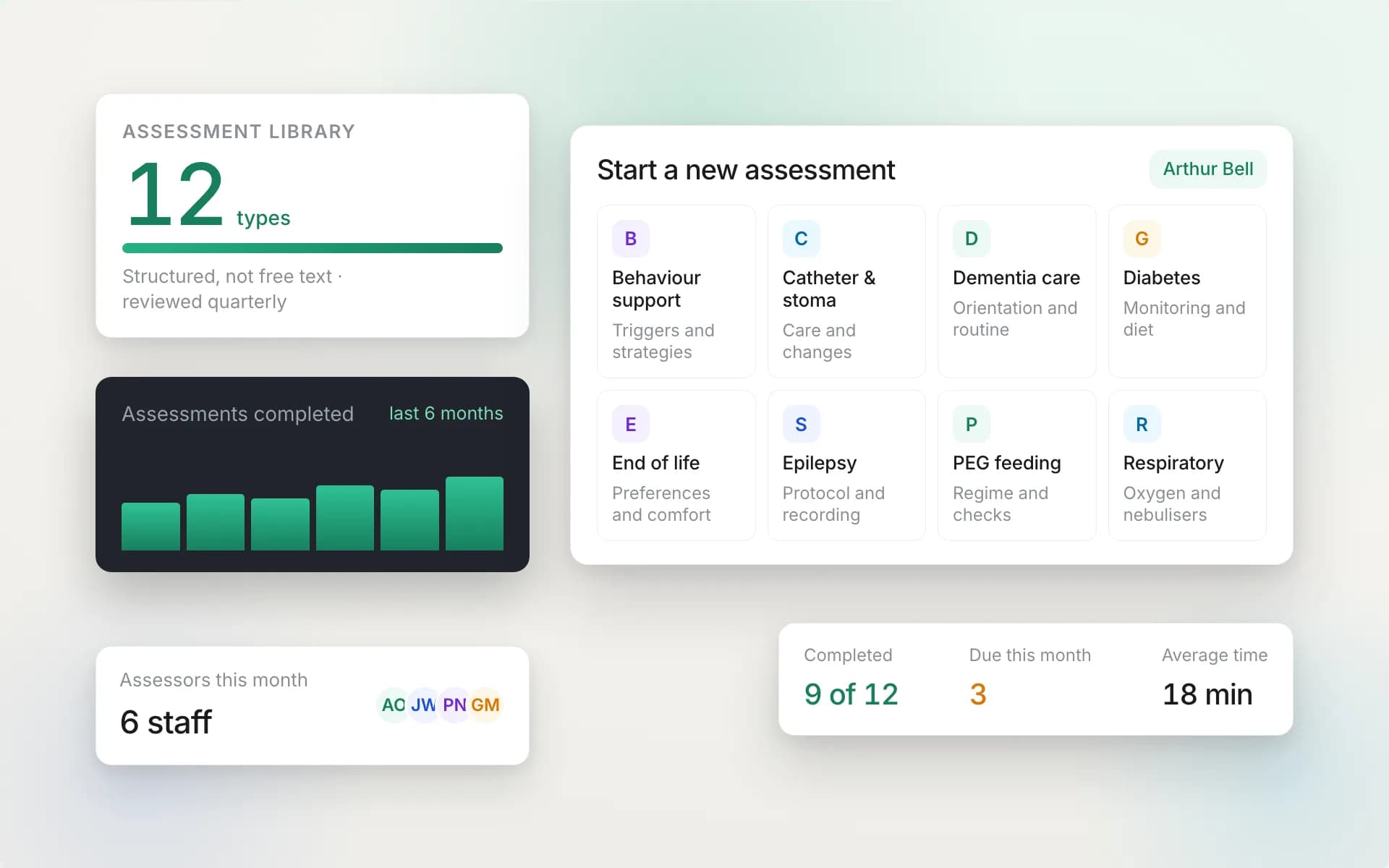
Assessments and care plans held as live records, with review dates tracked rather than remembered.
2. Scheduling and rostering
Getting the right person to the right place at the right time, repeatedly, while people call in sick. This is the module you will use most and the one most likely to decide whether you are happy in a year. Look for recurring patterns so a schedule is set once rather than retyped, real-time conflict detection, and a fast route to cover when somebody drops out.
3. Recording what happened
The mobile app your staff carry. It shows them their schedule and the care plan, captures what they did, and gives the office evidence that care was delivered. In visit-based settings that means geotagged check-in and check-out; in a care home it means shift-based recording against residents. Offline capability is not optional, because signal fails in lifts, rural homes and thick-walled buildings, which is precisely where you most need the record.
4. Medication (eMAR)
Electronic medication administration records. Medication is where providers carry the most risk and where paper fails most quietly: a missed dose on a paper MAR chart is discovered at audit, weeks later, when nothing can be done about it. A real eMAR presents each due dose at the point of care, records given, refused or withheld with a reason, and tells the office about a missed dose while there is still time to act.
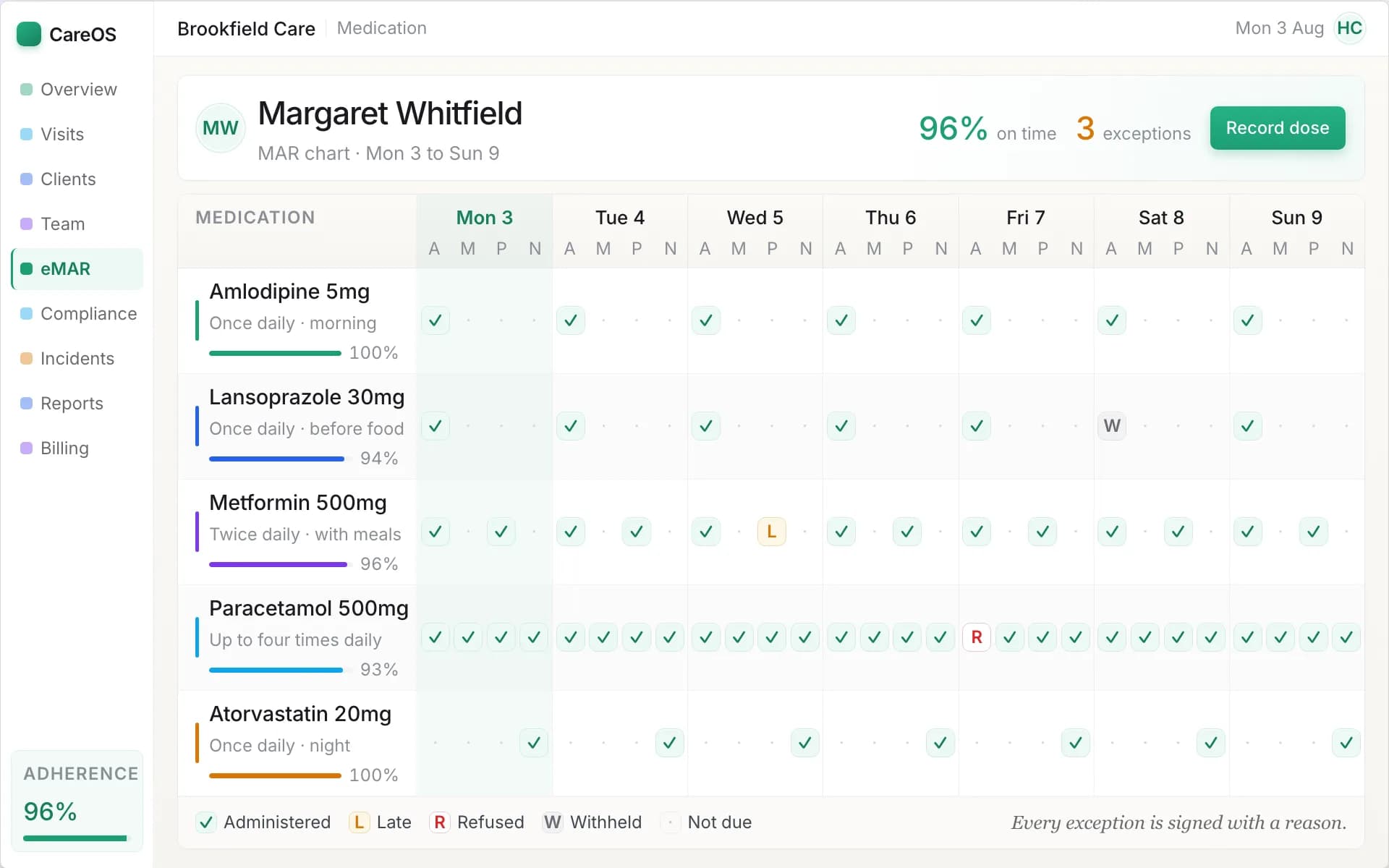
Each dose recorded against the person and the time it was due, with missed doses flagged to the office.
5. Workforce compliance
Your staff carry their own regulatory load: DBS checks, right to work, mandatory training, references, supervisions and appraisals. The software should track every requirement per person, flag what is expiring before it expires, and ideally refuse to roster somebody whose mandatory training has lapsed. This is a safety control first and an inspection asset second.
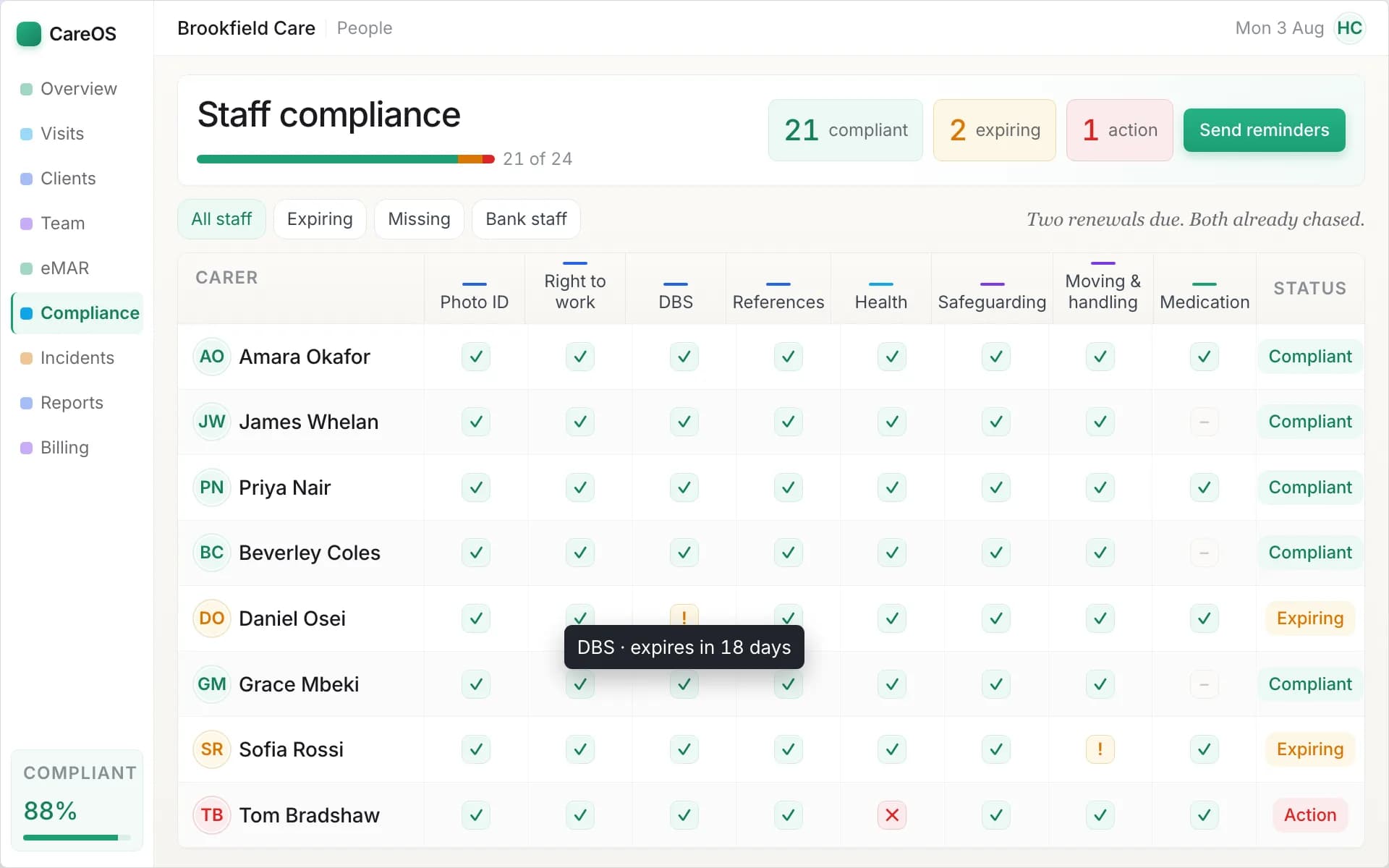
Every requirement tracked per staff member, with expiring items surfaced before they lapse.
6. Finance
The system already knows who was scheduled, who attended, for how long and at what rate. It should therefore produce invoices and payroll from that data rather than asking somebody to retype it into a spreadsheet. Ask specifically about split funding, where one person is part-funded by a local authority and part-privately, because it is common and it is where weaker systems fall over.
Care software and healthcare software are not the same market
This is the single most expensive misunderstanding in the category, and it is easy to make because the words overlap.
Healthcare software generally means clinical systems: electronic patient records in hospitals, GP practice systems, prescribing, diagnostics, referral management. The buyer is an NHS trust or a practice. The record is clinical, the regulator is different, and the interoperability requirements are enormous.
Care management software serves social care: home care, residential, supported living, children's services. The record is a care record, not a clinical one. The regulator is the CQC in England, or Ofsted for children's services, with the devolved equivalents elsewhere. The daily job is rostering, delivering and evidencing care, not diagnosing and treating.
The two touch at the edges, and that is where the confusion comes from. Care providers do handle medication, do work alongside district nurses and GPs, and do have to meet NHS data security standards. But the systems are built around different jobs, and a clinical product bent into a social care shape leaves you doing the parts it was never designed for by hand.
If you searched for healthcare software and landed here because you run a care service, you are in the right place and the wrong word. Everything below applies to you.
The UK regulatory picture, and what it demands of your software
Three things should shape your shortlist. A vendor who cannot talk fluently about all three is telling you something about how much UK care work they actually do.
CQC. The Care Quality Commission assesses your service against a set of quality statements, and the evidence it looks for maps almost exactly onto what this software produces: medication records, current care plans, staff compliance, incident records, audit trails, and proof that care was delivered. The right system makes that evidence a by-product of ordinary work rather than a project you run before an inspection. Ask any vendor to show you exactly what they would put in front of an inspector.
DSCR (Digital Social Care Records). NHS England's programme is moving the sector towards assured digital care record systems. Being on the Assured Solutions List matters if you want to access associated funding and demonstrate you are moving with the national direction of travel. Ask a vendor whether they are assured, or actively pursuing assurance, and treat a vague answer as an answer.
NHS DSPT (Data Security and Protection Toolkit). The annual self-assessment that proves you are handling care data safely. Your vendor holds your data, so their security posture directly affects your submission. Ask what standards they meet and whether they will support you through the toolkit.
How to compare vendors without being dazzled
Every vendor demonstrates well. Demos are rehearsed, run on clean data, and avoid the cases that break things. The way through is to stop evaluating features and start evaluating your own worst week.
Bring your own scenario. Do not accept the standard demo. Describe your actual Monday: the carer who calls in sick at 07:10, the person with a complex medication regime, the local authority that pays a different rate at weekends. Ask them to do it live. Twenty clicks to recover a sick call is a fact you want to learn now rather than in March.
Ask which setting it was built for. Then ask what they had to add to serve yours.
Get the total cost, at two sizes. Subscription plus setup, migration and any per-user add-ons, priced at your size today and at double it. Pricing models that scale with revenue are usually fair; ones that charge per user punish you for growing.
Interrogate the migration. How do your existing records, care plans and staff files get into the system? "You retype them" is a cost measured in weeks, and it is often not said out loud until after signature.
Test the support. Care runs at 7am on a Sunday. Ask about response times, who actually answers, and whether they understand the sector or just the software.
Read the exit clause. Contract length, notice period, and what happens to your data if you leave. You should be able to export everything and go. A vendor who makes leaving hard is telling you what they think of their own retention.
Speak to a reference customer who switched recently. Not a showcase client. Somebody who moved in the last year, in roughly your setting, at roughly your size. Ask them how the first month went.
Building your own comparison table
The most useful thing you can do is a single grid: your requirements down one side, your shortlisted vendors across the top, filled in from live demos rather than brochures. It sounds obvious and almost nobody does it, which is why buying decisions get made on rapport.
| Requirement | What to check |
|---|---|
| Setting fit | Built for your model, not adapted to it |
| Care planning | Live plans, review tracking, visible to staff at the point of care |
| Rostering | Recurring patterns, conflict detection, fast cover for absence |
| Recording | Mobile app, works offline, evidence of delivery |
| eMAR | Scheduled and as-needed doses, real-time missed-dose alerting |
| Compliance | Per-requirement tracking, expiry alerts, blocks unsafe rostering |
| Finance | Invoices and pay from actual delivery data, split funding handled |
| Regulation | Fluent on CQC or Ofsted, DSCR, and NHS DSPT |
| Migration | Vendor moves your data, with a defined process |
| Support | UK-based, sector-literate, answers early on a Sunday |
| Exit | Full data export, reasonable notice |
Fill a row with "they could not show me" and you have learned more than any feature list would have told you.
Where to go next
If you are weighing what the AI in these systems actually does, and what it should never be allowed to do, the guide to AI care management software walks through it capability by capability.
If you run a home care agency, the domiciliary care software buyer's guide is the detailed version of this for visit-based care, and our comparison of the best domiciliary care software in the UK scores the leading systems against these criteria. For other settings, the product pages for care homes, supported living, children's homes and care staffing each set out what changes.
CareOS is care management software built for UK providers across all five settings, with care planning, rostering, mobile recording, eMAR, compliance and finance in one system designed around CQC, Ofsted and NHS requirements. It belongs on your shortlist as one option among several, and it is a fair benchmark to hold the others against. If you would like to see it run your own worst-case week rather than a rehearsed script, book a demo and bring the scenario that breaks your current setup.
Frequently asked questions
What is care management software?
It is the operational system a regulated care provider runs on. It holds the records of the people you support, plans their care, rosters staff to deliver it, captures what happened, tracks workforce compliance, and produces invoices and payroll from that same data. A rota tool or an eMAR product on its own is a module, not a care management system.
What is the difference between care management software and healthcare software?
Healthcare software generally means clinical systems: hospital patient records, GP practice systems, prescribing and diagnostics, bought by NHS trusts and practices. Care management software serves social care providers, where the record is a care record rather than a clinical one and the regulator is the CQC or Ofsted. The two overlap at the edges but are built around different jobs.
Do I need different software for a care home and a home care agency?
Usually yes, or at least a system that genuinely supports both models rather than one bent into the other's shape. Home care is visit-based, so travel time, rota density and proof that a visit happened are central. A care home has everyone under one roof, so shift cover, occupancy and volume of daily records matter instead. Ask any vendor which setting their product was built for.
Will care management software help with a CQC inspection?
Directly, if it is the right system. The evidence inspectors ask for, medication records, current care plans, staff compliance, incident records and audit trails, is exactly what this software produces as a by-product of daily work. The difference at inspection is between running a report and searching a filing cabinet.
What is DSCR and does it matter when choosing a system?
DSCR stands for Digital Social Care Records, NHS England's programme moving the sector towards assured digital care record systems. It matters because assurance affects access to associated funding and signals that a vendor is working to the national standard. Ask whether a vendor is assured or actively pursuing assurance.
How long does it take to move onto a new care management system?
Plan for three phases: migrating your existing records, care plans and staff files; a short period running the new system alongside your current process so nothing is lost; then cutover and training. The variable that decides the timeline is whether the vendor migrates your data or expects you to retype it, so ask that question early.
Keep reading
- Electronic Care Planning: What Makes a Care Plan Live Rather Than LaminatedA paper care plan is accurate on the day it is printed and quietly wrong thereafter. What separates electronic care planning from electronic paper: linked risks, tracked reviews, point-of-care access, and an audit trail that makes the record evidence.
- AI Care Management Software in 2026: Every Native Capability, and What It Does for a Care ManagerA working guide to AI in care management software: what it genuinely does across rostering, assessment, care recording, early warning, medication and compliance, the four tests to hold any vendor to, and the questions to ask in a demo.
- CQC Compliance Software: Turning Daily Work into Inspection EvidenceMost providers who get a poor rating are delivering decent care they cannot prove. What CQC compliance software does, where evidence usually fails, and how to tell a system that notices from one that only records.
CareOS by care setting
The platform is one system with a workspace per setting. See what it looks like for yours:
See CareOS against your own worst-case Monday
CareOS is UK care management software: rostering, eMAR, care plans, compliance and finance in one system, with a workspace built for each care setting and designed around CQC, Ofsted and DSCR requirements.
Book a demo