
Domiciliary Care Software in 2026: The Complete Buyer's Guide for UK Home Care Agencies
If you run a domiciliary care agency, you already know the real work is not delivering care. Your carers are excellent at that. The real work is everything around it: building a rota that survives a Monday morning of call-offs, proving to the CQC that every medication was given, invoicing a local authority correctly, and knowing at 9am whether the 7am visits actually happened. Most agencies still hold that together with spreadsheets, a WhatsApp group, and the memory of one very stressed coordinator.
Domiciliary care software exists to take that load off people and put it into a system. But the market is crowded, the sales demos all look the same, and the wrong choice locks you into a two-year contract you will resent by month three. This guide is the one we wish existed when agencies ask us what to look for. It is vendor-neutral for almost all of it. Near the end we show how CareOS maps onto the checklist as a worked example, so the abstract features have something concrete to sit against, but the checklist works for any provider you evaluate.
By the end you will know what domiciliary care software actually does, which features matter and which are demo theatre, how the compliance picture (CQC, DSCR, NHS DSPT) should shape your shortlist, and a scoring method you can use to compare vendors without being dazzled.
What is domiciliary care software?
Domiciliary care software is a management system for agencies that deliver care in people's own homes, as opposed to a care home or supported living setting. It replaces the paper and spreadsheet stack with a single platform that handles the full operating cycle of a home care agency: taking on clients, planning their care, scheduling visits, sending carers to the right address at the right time, recording what happened during each visit, managing staff and their compliance, and turning all of that into invoices and payroll.
The term overlaps with a few others you will see used interchangeably. Home care software and home care agency software mean the same thing. Home care management software is the broader category label. Care rostering software or rota software usually refers to one module inside the wider platform, the scheduling engine, rather than the whole thing. When a vendor says eMAR, they mean the electronic medication administration record, another module. A complete domiciliary care system contains all of these, not just one.
The distinction that matters most: domiciliary care is visit-based. Care is delivered as discrete scheduled visits to scattered addresses, so travel time, geolocation, visit verification, and rota density are central concerns. Software built for care homes assumes everyone is under one roof and gets these things wrong for home care. Always check that a system was built for, or genuinely adapted to, the domiciliary model.
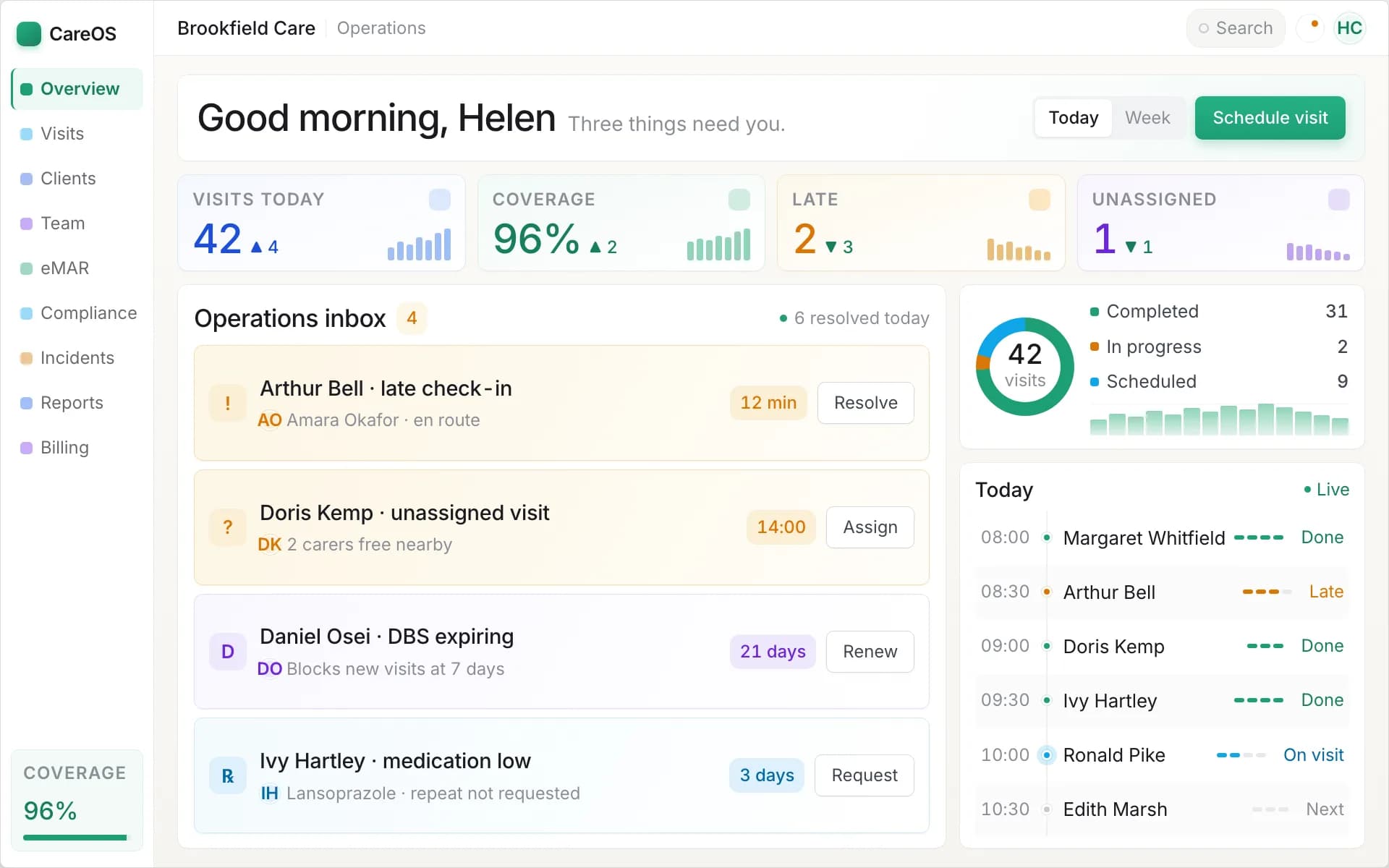
The CareOS operations dashboard: the day's visits, alerts and outstanding actions in one view.
Why agencies move off spreadsheets and legacy systems
Nobody buys software because they are bored. They buy it because something broke. The common triggers:
The rota stopped scaling. A spreadsheet rota works at 30 clients and one coordinator. At 80 clients across a county with 40 carers, it becomes a full-time job for two people and it still produces gaps, double-bookings, and carers driving past three clients to reach a fourth. Domiciliary care rota software that understands travel, availability, and continuity of care removes most of that.
A CQC inspection exposed the paperwork. Inspectors ask for evidence, not assurances. "We always give the medication" is worth nothing without a MAR chart that proves it. Agencies routinely score badly on well-led and safe not because the care is poor but because they cannot produce the record. Home care management software makes the evidence a by-product of doing the work, not a separate task done badly at month end.
Invoicing and payroll leaked money. Manual timesheets over-claim and under-claim in roughly equal measure. Visits that ran long get missed. Local authority rates differ from private rates and get applied wrongly. Mileage is guessed. Over a year this is thousands of pounds in either lost revenue or overpaid wages, and it is invisible until someone reconciles it.
The office could not see what was happening in the field. Without visit verification, the office does not know a visit was missed until the family phones. That is the single most dangerous gap in home care, and it is the one carers' mobile apps and live monitoring close.
If none of these apply to you yet, you may not need to buy anything this year. If two or more do, the cost of the software is almost always less than the cost of the problems.
Core features to look for
This is the heart of the evaluation. Every vendor will claim all of these. Your job is to test how well each one actually works, because the gap between "we have a rota" and "we have a rota that rebuilds itself when a carer calls in sick" is enormous.
Rostering and scheduling
The scheduling engine is the spine of the system and the feature you will use most. Our separate guide to home care rostering software goes deeper on the scheduling engine itself; here is what to look for:
- Recurring visit patterns, so a client's weekly schedule is set once and generated forward, not retyped.
- Travel-aware allocation that considers where a carer is coming from, not just whether they are free.
- Continuity of care, so the same small group of carers sees the same client rather than a rotating cast of strangers.
- Real-time conflict detection that stops you double-booking a carer or scheduling two people for a one-person visit.
- Fast re-allocation when someone calls in sick, ideally with the system suggesting the best available cover.
Test this with a real scenario during the demo. Ask them to remove a carer from Monday and show you how quickly the affected visits get recovered. If it takes twenty clicks, imagine that at 8am on a bad week.
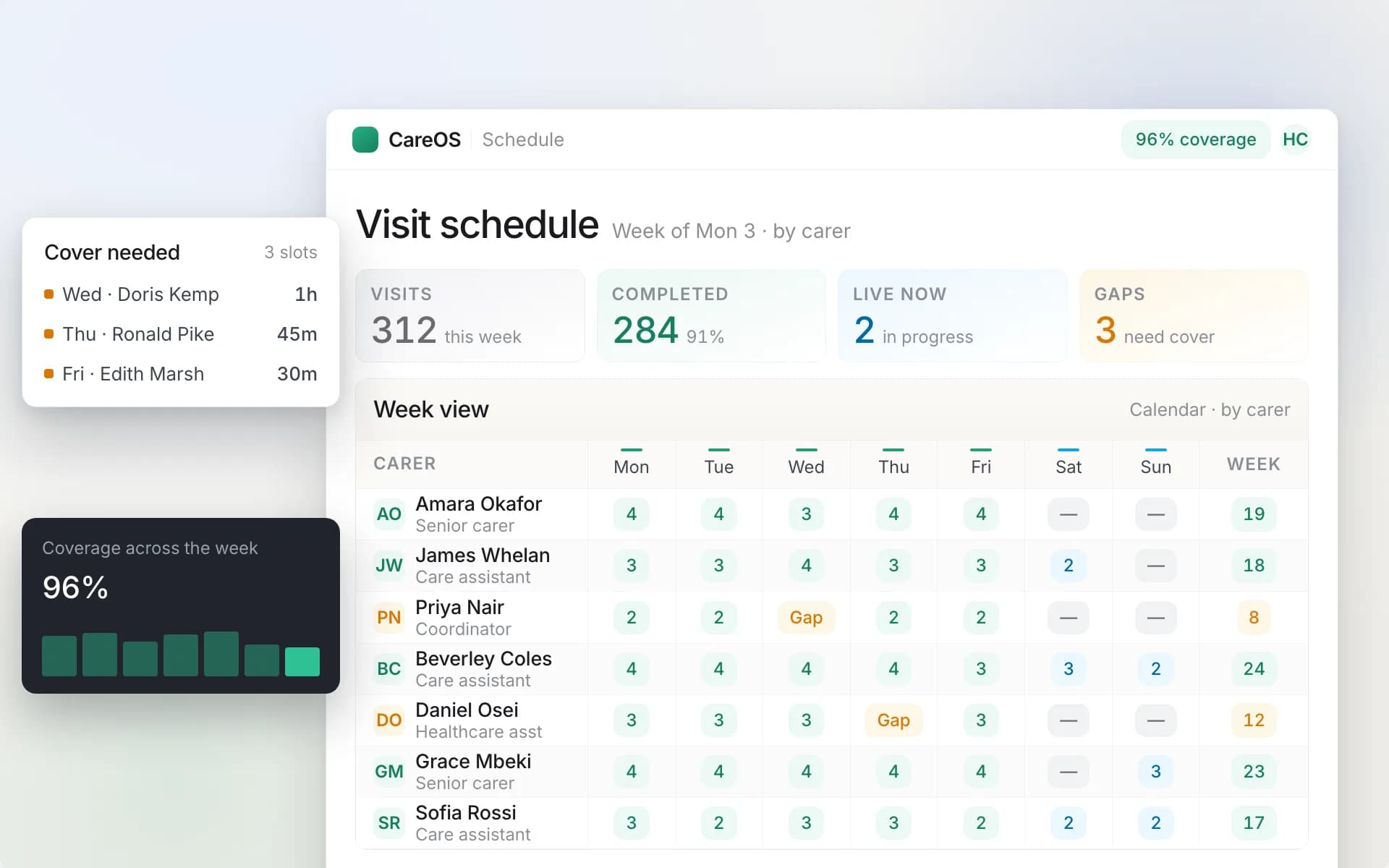
The scheduling board: recurring visit patterns, travel-aware allocation and real-time conflict detection.
Visit verification and carer mobile app
The carer's phone is where care is recorded and where the office gets its eyes on the field. A strong mobile app gives carers their schedule, the client's care plan, and tasks for each visit, and captures check-in and check-out with a geotag and timestamp so you have proof the visit happened at the right place and time. Electronic call monitoring built into the app, rather than a separate phone-line system, is now the standard.
Check that the app works offline. Carers lose signal in lifts, rural homes, and thick-walled buildings. If the app cannot record a visit without a connection and sync later, it will fail in exactly the places you most need a record.
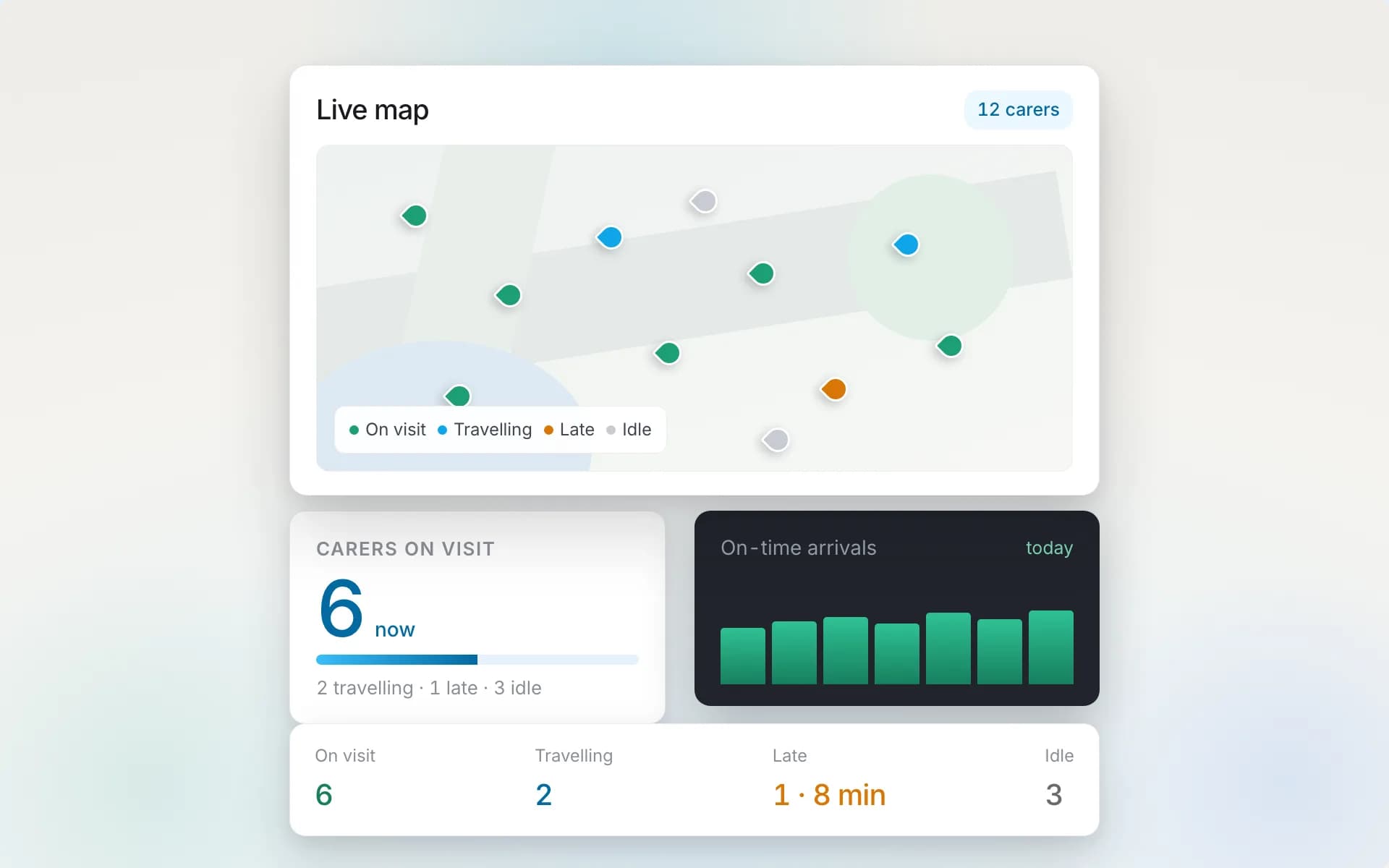
Live monitoring: the office sees who has checked in, who is en route, and any missed visit as it happens.
Electronic MAR (eMAR)
Medication is where home care agencies carry the most risk and where paper MAR charts fail most often. Electronic MAR presents each due dose to the carer at the visit, records administered, refused, or withheld with a reason, and flags missed doses to the office in real time rather than at month-end audit. Look for support for scheduled and PRN (as-needed) medication, controlled-drug witnessing, and a clear MAR chart the office and inspectors can read at a glance.
The office-side alerting is what separates a real eMAR from a digital form. If a dose is due and unrecorded past its window, someone in the office should be told while there is still time to act.
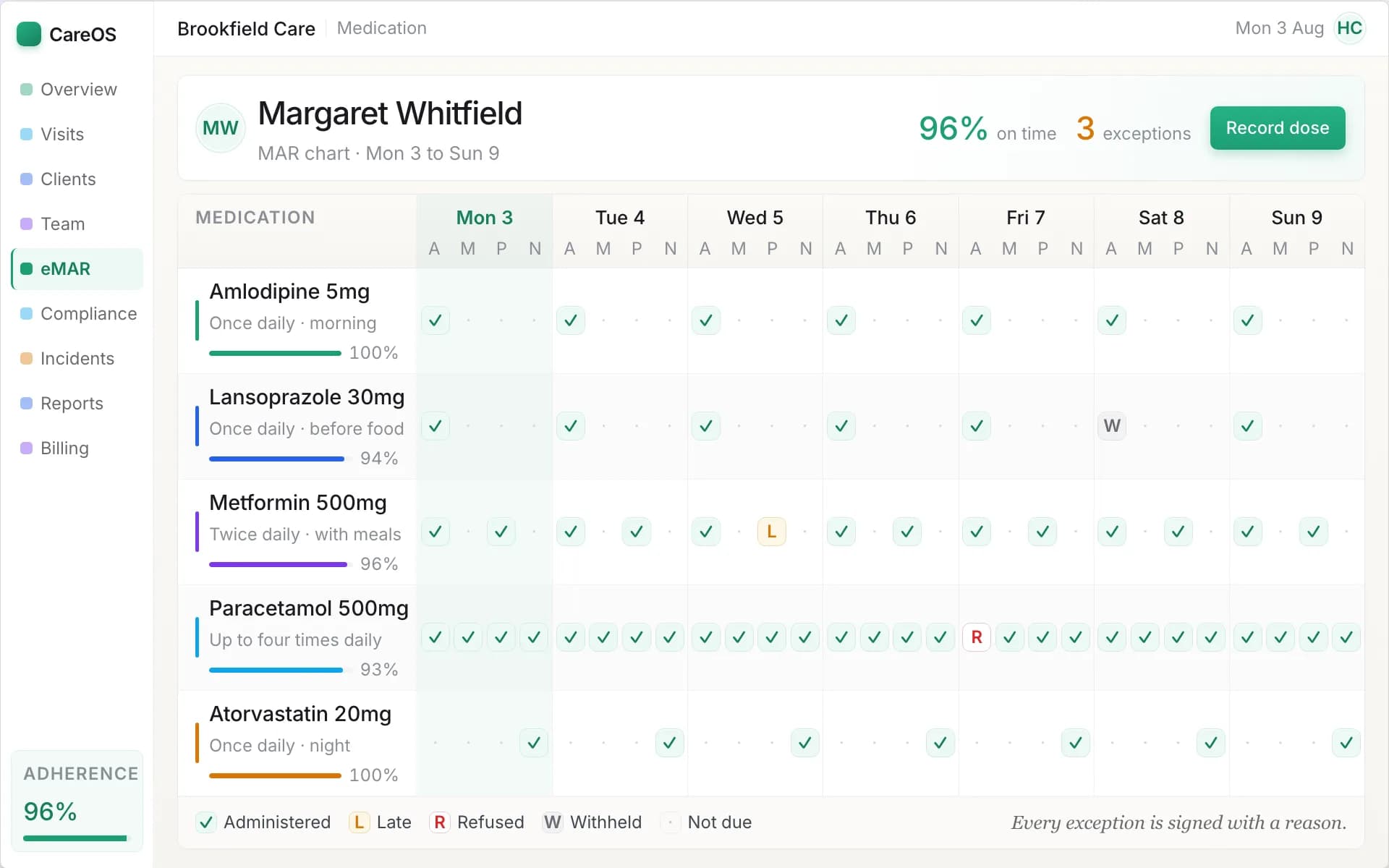
The eMAR chart: each dose recorded as given, refused or withheld, with missed doses flagged to the office in real time.
Care plans and assessments
The care plan is the clinical and legal record of what care a person needs and consents to. Good software lets you build person-centred care plans, keep them under review, and surface the relevant parts to the carer on their app at the point of care, so a new carer covering a visit knows the client's needs, risks, and preferences without phoning the office. Digital risk assessments that link to the care plan, and review-date tracking that reminds you before a plan lapses, are the marks of a system built for regulated care rather than generic task management.
Compliance and staff management
Your carers carry their own compliance load: DBS checks, training, right-to-work, references, supervisions, and appraisals. Home care agency software should track every requirement per staff member, flag what is expiring, and ideally stop you rostering a carer whose mandatory training has lapsed. This is both a safety control and an inspection asset. When the CQC asks whether your staff are safe to deliver care, the answer should be a report, not a filing cabinet.
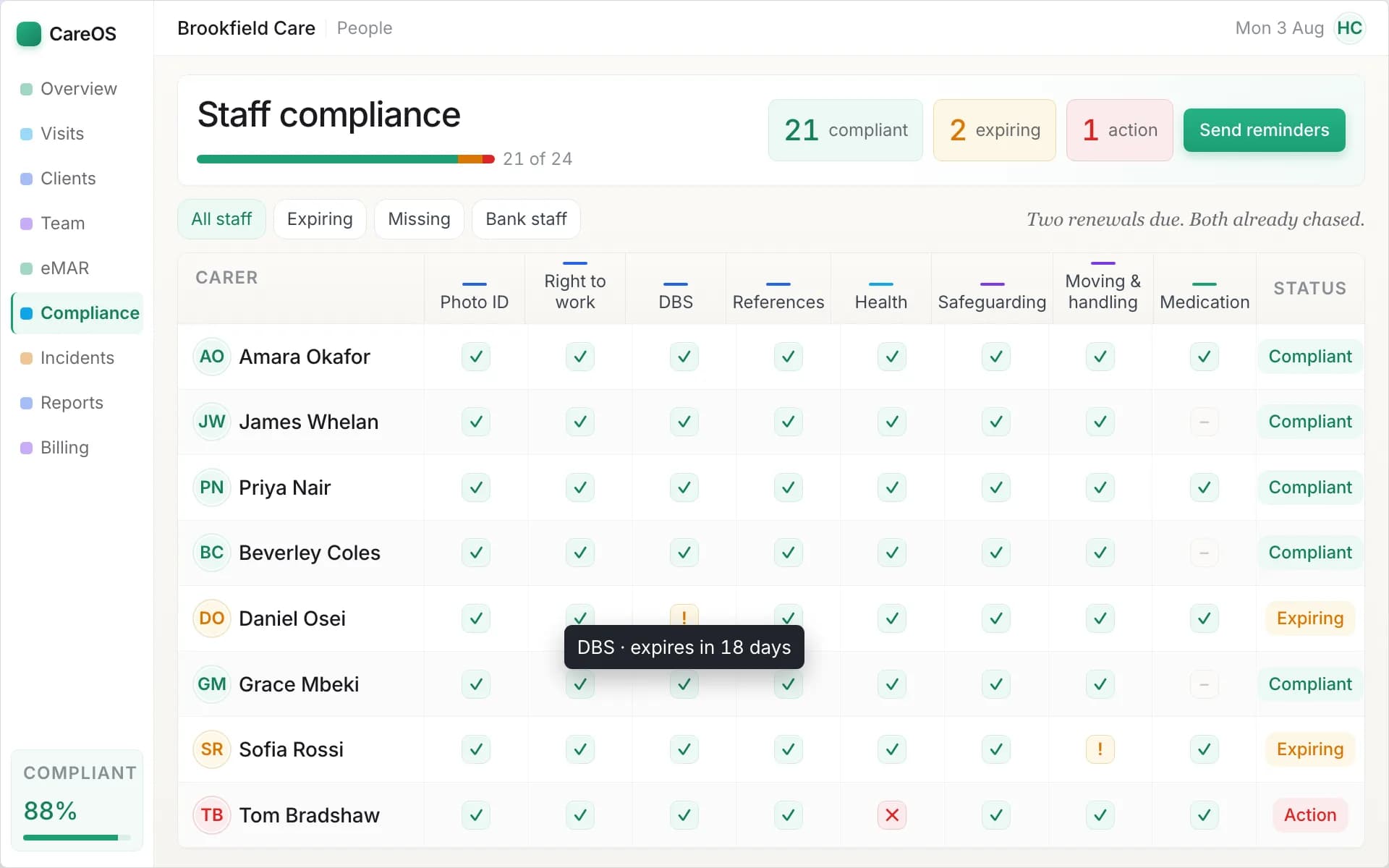
The compliance matrix: every carer's DBS, training and right-to-work status at a glance, with expiring items flagged.
Finance, invoicing, and payroll
The system already knows who was scheduled, who attended, for how long, and at what rate. It should therefore be able to generate invoices and payroll from the visit data automatically, applying the right rate to the right funder, handling local authority and private clients differently, and accounting for travel time and mileage. Ask specifically about split funding, where one client is part-funded by the local authority and part-privately, because it is common and it is where weaker systems fall down. Ask too how it evidences National Living Wage compliance once travel between clients is counted as working time; our guide to NLW compliance in home care explains what to look for.
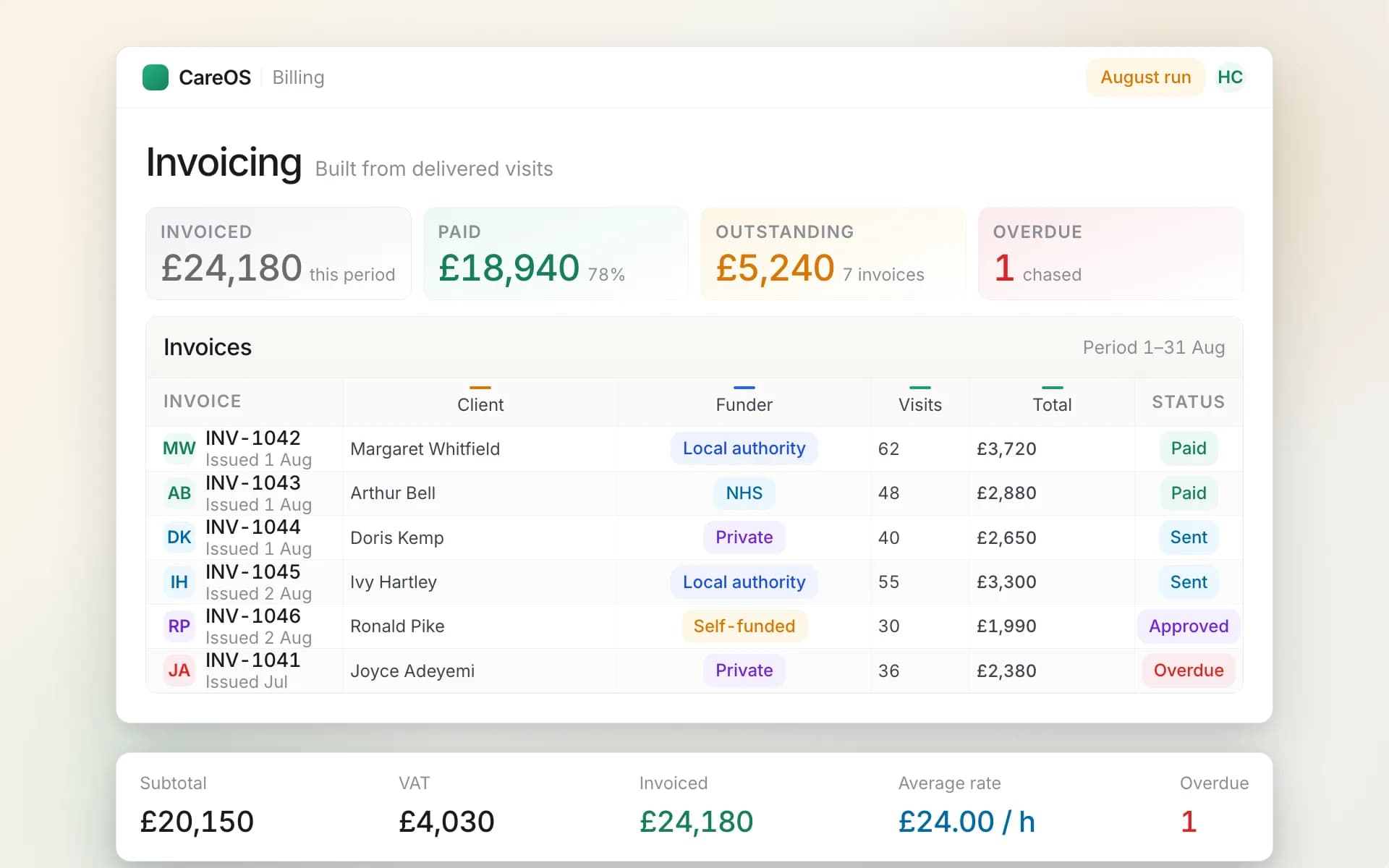
Invoices generated straight from visit data, with local-authority and private funders handled separately.
Family portal and communication
Families want reassurance without phoning the office ten times a day. A family portal that shows relatives what care was delivered, when, and by whom reduces inbound calls and builds trust. It also becomes a selling point when families are choosing between agencies. Check that the portal shows the family what you want it to and nothing you do not, and that the boundary between carer and family messaging is controlled.
Travel time, mapping and route planning
Travel is the cost that care-home software never has to think about and domiciliary care software has to get right. Every visit starts with a journey, and across a week those journeys decide whether a rota is profitable, whether carers arrive on time, and whether you are paying the minimum wage correctly once travel between clients is counted as working time. Mapping is not a nice-to-have module; it sits underneath rostering, pay and the live picture of the day.
What to look for:
- Real drive times, not straight lines. Allocation should use road travel time between the previous visit and the next one, at the time of day the visit happens. A carer who looks free on a list can be forty minutes away on a map.
- Rounds and clustering. The system should help you build geographic rounds so a carer's day stays inside an area, and should show you when a proposed change breaks that. Continuity and clustering pull in opposite directions; you want to see the trade-off, not discover it on Monday.
- A live map of the day. The office should be able to see who has checked in, who is en route, and where the next gap is going to open, without phoning anyone.
- Mileage and travel time captured per visit. Expenses, invoicing for travel where a funder pays it, and pay all depend on the same record. If it is typed in at the end of the week it is wrong.
- Travel as working time. Time spent travelling between clients counts towards the National Living Wage. Software that records scheduled and actual travel, and shows the effect on a worker's effective hourly rate before the rota is confirmed, turns a payroll risk into a rota decision. Our guide to National Living Wage compliance in home care covers the rules and the calculation.
- Carers without cars, rural patches, and public transport. Ask how the system handles a carer on foot or by bus, and how it copes with a rural round where the map matters more than the client list.
The test to run in a demo: pick one real carer's day and ask the vendor to show it on a map with total travel time and mileage. If the answer is a spreadsheet, the mapping is not real.
Compliance: CQC, DSCR, and NHS DSPT
This is where UK-specific software earns its place, and where generic international scheduling tools quietly fail. Three things should shape your shortlist.
CQC. The Care Quality Commission regulates your service, and its five key questions (safe, effective, caring, responsive, well-led), assessed through its quality statements, map directly onto what software can evidence. Regulation 17 (good governance) requires an accurate, complete and contemporaneous record for each person, and Regulation 12 (safe care and treatment) covers the proper and safe management of medicines; both are records questions before they are care questions. Safe care needs medication records and visit verification. Effective care needs current care plans and trained staff. Well-led needs audit trails, oversight, and reporting. The right system is not just compliant itself; it manufactures the evidence you present at inspection as a normal by-product of daily work. Ask any vendor to show you exactly what they would hand an inspector.
DSCR (Digital Social Care Records). NHS England's Digitising Social Care programme is pushing the sector towards assured digital care record systems, and being on its Assured Solutions list matters if you want to access funding and demonstrate you are meeting the national direction of travel. Ask whether the vendor is assured or actively pursuing assurance. It signals both credibility and staying power.
NHS DSPT (Data Security and Protection Toolkit). Handling care data means meeting data-security standards, and the DSPT is the annual self-assessment that proves it. Your software vendor's own data-security posture directly affects your ability to complete the toolkit, because their systems hold your data. Ask what security standards they meet and whether they can support your DSPT submission.
A vendor who cannot speak fluently about all three is telling you they do not really work in UK home care. That alone should shorten your list.
How to evaluate a provider
Features are necessary but not sufficient. The things that determine whether you are happy in two years are mostly not on the feature grid.
- Was it built for domiciliary care? Not adapted from a care-home product, not a generic field-service tool. Visit-based care has specific needs and it shows immediately in the rota and the mobile app.
- How is it priced? Per client, per carer, per visit, or a flat fee? Per-client pricing scales with your revenue, which is usually fair. Watch for setup fees, module add-ons, and per-user charges that punish growth. Get the total cost at your current size and at double your size.
- Implementation and data migration. How do they get your existing client data, care plans, and staff records into the system? A migration that means retyping 80 care plans by hand is a hidden cost measured in weeks. Ask whether they migrate from your current system and what that involves.
- Support. UK-based, care-sector-literate support that answers when your rota breaks at 8am is worth more than a longer feature list. Ask about response times and who actually picks up.
- Contract terms. Length, notice period, what happens to your data if you leave. You should be able to export your data and go. If leaving is hard, that is a red flag about their confidence in the product.
- Roadmap and stability. Is the company actively building, or is the product frozen? A living platform ships improvements; a dying one collects your subscription and stands still.
What good looks like: a worked example
To make the checklist concrete rather than abstract, here is how CareOS maps onto it. We are using it as a single worked example, not as the only answer. Run any vendor you consider through the same grid.
| Requirement | What to look for | What it looks like in CareOS |
|---|---|---|
| Domiciliary-first design | Visit-based scheduling, travel-aware | Visits, not shifts, are the unit of work: a client's week is a set of recurring visits and every screen (rota, app, map, invoice) is built from them |
| Rostering | Recurring patterns, conflict detection, fast cover | Remove a carer from Monday and SmartRota suggests cover for each affected visit from continuity, skills, availability and travel time, and shows why each match was made (the scheduling board above) |
| Travel and mapping | Real drive times, live map, mileage per visit | Allocation uses travel time between visits; the live map shows checked-in, en route and missed visits; travel time between visits is recorded and counted towards pay |
| Visit verification | Geotagged check-in/out, offline capable | Check-in and check-out in the carer app with location and time; a visit recorded without signal syncs when the phone reconnects |
| eMAR | Scheduled and PRN, office alerting | Each due dose is presented at the visit and recorded as given, refused or withheld with a reason; a dose past its window is flagged to the office while there is still time to act (the eMAR chart above) |
| Care plans | Person-centred, review tracking, on the carer's app | Assessments flow into a person-centred plan with risks and tasks; review dates alert before a plan lapses; a covering carer sees the plan on the app at the door |
| Staff compliance | Per-requirement tracking, expiry flags | The compliance matrix holds DBS, training, right-to-work and references per carer with expiry alerts (the matrix above) |
| Finance | Auto invoicing and payroll from visit data | Invoices and payroll are generated from actual visit data with per-funder rates, split funding per client and travel time counted for pay |
| Family portal | Controlled visibility for relatives | Relatives see delivered care and messages through a portal whose visibility the agency controls |
| UK compliance | CQC, DSCR, DSPT literate | The records above are the Regulation 17 record; medication records are the Regulation 12 evidence; the audit trail is what is handed to an inspector |
The point of the table is not the ticks. It is that you should be able to build one like it for every vendor on your shortlist and compare them side by side. If a vendor cannot fill a row, that is your answer for that row.
Implementation and migration
Buying the software is the easy part. Getting your agency onto it without a fortnight of chaos is the part that decides whether the investment pays off.
Plan for three phases. First, data migration: your client list, care plans, staff records, and compliance data move into the new system. Ask the vendor to do the heavy lifting here, and be wary of any answer that amounts to "you retype it." Second, parallel running: for a week or two you run the new system alongside the old process so that if something is missing you have not lost anything. Third, cutover and training: carers need their app and a short walkthrough, and the office needs to know the new rota and finance flows. Good vendors have done this many times and will have a defined onboarding process. Ask to speak to a reference customer who switched recently, and ask them specifically how the first month went.
Bringing it together
Domiciliary care software is not a luxury or a compliance tick-box. For an agency past its first few dozen clients it is the difference between a coordinator who spends the day firefighting the rota and one who spends it improving the service. The features that matter are visit-based rostering, a carer app with proper visit verification, electronic MAR with real-time alerting, live care plans, staff compliance tracking, and finance that flows from the visit data automatically. The things that matter most are the ones not on the feature grid: that it was built for home care, that it is priced fairly, that migration is handled, and that support answers when the rota breaks.
Build the comparison table, run every vendor through it, and demand a live demo of your own worst-case Monday rather than a polished script. If you want a head start, our ranked comparison of the best domiciliary care software UK scores the leading systems against exactly these criteria. The right system will make that Monday boring, which is the highest praise home care software can earn.
CareOS was built from the ground up for UK home care agencies — home care management software covering rostering, eMAR, care plans, compliance, and finance in one system designed around CQC and DSCR requirements. It is one place to start your comparison, and a fair benchmark to hold the others against. If you would like to see it against your own worst-case Monday, book a demo and bring the scenario that breaks your current setup.
Sources and further reading
- Care Quality Commission, Regulation 17: Good governance
- Care Quality Commission, Regulation 12: Safe care and treatment
- Care Quality Commission, Assessment framework and quality statements
- NHS England, Digitising Social Care (Digital Social Care Records and the Assured Solutions list)
- NHS England, Data Security and Protection Toolkit
- GOV.UK, Calculating the minimum wage: working hours (travel between assignments as working time)
Sources checked September 2026. This guide is reviewed when CQC, Digitising Social Care or minimum-wage guidance changes, and in any event once a year.
Frequently asked questions
What is the difference between domiciliary care software and care home software?
Domiciliary care software is built for care delivered in people's own homes as scheduled visits, so it centres on rostering, travel, and visit verification. Care home software assumes residents are in one building and handles occupancy and 24-hour care instead. Using one for the other causes constant friction.
How much does domiciliary care software cost?
Pricing is usually per client, per carer, or a flat monthly fee, and varies with the size of your agency and the modules you use. The more useful question is total cost of ownership: the subscription plus setup, migration, and any per-user add-ons, measured at your current size and at the size you expect to be.
Do I need eMAR if my carers already record medication on paper?
Paper MAR charts are legal but they fail silently. A missed dose is only discovered at audit, by which point it is too late to act. Electronic MAR flags a missed or late dose to the office in real time, which is both safer and far stronger evidence at inspection.
Will the software help with CQC inspections?
Directly. The right system produces the evidence inspectors ask for, medication records, current care plans, staff compliance, visit verification, and audit trails, as a normal by-product of daily work rather than a scramble before the inspection.
Can I move my data from my current system?
You should be able to. Ask any vendor how they migrate client data, care plans, and staff records from your existing system, and ask how you would export your data if you ever left them. Both answers tell you a lot.
Is home care software the same as domiciliary care software?
Yes. Domiciliary care is the regulatory and commissioning term in the UK for care delivered in someone's own home; home care is the everyday name for the same service. Home care management software and home care agency software describe the same category. Care rostering or rota software is one module inside it, the scheduling engine, rather than a complete system.
Does domiciliary care software work offline?
The office system is web-based and needs a connection, but the carer app should not. Carers lose signal in lifts, rural homes and thick-walled buildings, so the app must let them open the care plan, record the visit and medication without a connection, then sync when the phone reconnects. Ask to see a visit recorded in airplane mode during the demo.
What is electronic call monitoring and do I need it?
Electronic call monitoring, or ECM, is the record of when a carer arrived at and left a visit, captured electronically rather than on a timesheet. Modern systems do it through the carer app with a location and time stamp at check-in and check-out. If your local authority contract specifies ECM, check that the app's records meet its requirements; if it does not, you still want it, because it is the evidence that a visit happened at the right place and time.
How long does it take to switch domiciliary care software?
Plan in three phases: data migration of clients, care plans and staff records, which the vendor should do for you; a short period of running the new system alongside the old one; then cutover with carer app training. For most agencies that is a matter of weeks rather than months, and the part that decides it is how much of the migration the vendor takes on rather than handing back to you to retype.
Keep reading
- National Living Wage Compliance in Home Care: The 2026 Guide for UK Domiciliary Care ProvidersPaying a carer £13 per contact hour does not mean they receive the National Living Wage. Which hours and payments count, how to calculate the effective hourly rate, and how to find shortfalls before payroll.
- CQC Compliance Software: Turning Daily Work into Inspection EvidenceMost providers who get a poor rating are delivering decent care they cannot prove. What CQC compliance software does, where evidence usually fails, and how to tell a system that notices from one that only records.
- Care Rostering Software: How to Build a Rota That Survives Monday MorningThe rota is where a care service is actually run, and it is usually held together by one person and a spreadsheet. How rostering software encodes what they know, and the five scenarios to insist on in a demo.
CareOS by care setting
The platform is one system with a workspace per setting. See what it looks like for yours:
See CareOS against your own worst-case Monday
CareOS is UK care management software: rostering, eMAR, care plans, compliance and finance in one system, with a workspace built for each care setting and designed around CQC, Ofsted and DSCR requirements.
Book a demo